# Overview
Welcome to the official Birthday Bot Documentation!
**Example Announcements (Fully customizable):**

Example Custom Event
Example Member Anniversary Message
Example Server Anniversary Message
In your Discord server, Birthday Bot will track your users' birthdays and, using their time zone, celebrate their birthday through its customizable birthday role and message. Additionally, Birthday Bot can celebrate the anniversary of members joining the server and the anniversary of your server's creation!
**If you haven't already, invite Birthday Bot to your discord** [**here**](https://discordapp.com/api/oauth2/authorize?client_id=656621136808902656\&permissions=269053008\&scope=bot)**.**
## **Free Features**:
* Each user can [set their birthday & time zone](https://birthdaybot.scottbucher.dev/setting-your-birthday) into the bot, which stores that information into a database, allowing the bot to know on what day and what time zone to celebrate the user's birthday
* Birthday System: Celebrate birthdays in your server!
* By default, birthdays are shown in all servers with Birthday Bot, and birth years/ages are hidden. Users and server owners can customize this:
* Users can use `/user` to edit their global settings and `/user_server` to edit their server-specific settings. [User Privacy Settings](https://birthdaybot.scottbucher.dev/faq-1/user/user-privacy).
* Server owners can set up a custom [birthday blacklist](https://birthdaybot.scottbucher.dev/faq-1/birthday-system#what-is-the-birthday-blacklist) to prevent certain users and/or roles from having their birthday celebrated and shown in the server.
* Server owners can set up the [trusted role system](https://birthdaybot.scottbucher.dev/faq-1/birthday-system/trusted-system) in order to lock certain or all things related to the birthday system behind a specific role.
* Customize if the trusted role prevents users from receiving the birthday role, birthday message, and/or appearing in the `/next` and `/list` command.
* Server owners can disable all ages in their server with the [disable ages setting](https://birthdaybot.scottbucher.dev/faq-1/birthday-system#what-is-the-disable-ages-setting).
* The [birthday channel](https://birthdaybot.scottbucher.dev/faq-1/birthday-system#what-is-the-birthday-channel) is the channel where the bot will post birthday messages and you can customize:
* A unique custom birthday message! [Learn more about custom messages](https://birthdaybot.scottbucher.dev/faq-1/custom-messages).
* The [time](https://birthdaybot.scottbucher.dev/faq-1/custom-messages#what-is-the-message-time) of day the birthday messages are posted.
* Whether birthdays are celebrated based on the user's time zone or the server's time zone using the [use time zone setting](https://birthdaybot.scottbucher.dev/faq-1/birthday-system#what-is-the-use-time-zone-setting).
* A custom [ping setting](https://birthdaybot.scottbucher.dev/faq-1/custom-messages#what-is-a-message-ping) for all birthday messages.
* The [birthday role](https://birthdaybot.scottbucher.dev/faq-1/birthday-system#what-is-the-birthday-role) is the role that will be given to users on their birthday and taken from those whose birthday it isn't.
* Anniversary System - Celebrate member and server anniversaries in your server!
* Requires the [server time zone](https://birthdaybot.scottbucher.dev/faq-1/general#what-is-the-server-time-zone-setting) to be set
* Customize:
* A unique custom member anniversary message! [Learn more about custom messages](https://birthdaybot.scottbucher.dev/faq-1/custom-messages).
* A unique custom serveranniversary message! [Learn more about custom messages](https://birthdaybot.scottbucher.dev/faq-1/custom-messages).
* The [time](https://birthdaybot.scottbucher.dev/faq-1/custom-messages#what-is-the-message-time) of day the anniversary messages are posted.
* A custom [ping setting](https://birthdaybot.scottbucher.dev/faq-1/custom-messages#what-is-a-message-ping) for all anniversary messages.
* Configure many more settings such as:
* [Name format settings](https://birthdaybot.scottbucher.dev/faq-1/general#what-is-the-name-format-setting) which decide how the bot displays names in custom messages, the `/list` command, and everywhere else!
* How dates are detected in your server with the [date format setting](https://birthdaybot.scottbucher.dev/faq-1/general#what-is-the-date-format-setting).
* View upcoming birthdays/anniversaries.
* Clear your information from the database at any time.
* Near 24/7 up-time!
## [Premium Features](/premium-features):
* Avoid having to vote to use some commands.
* [Priority message posting](https://birthdaybot.scottbucher.dev/premium-features#priority-message-posting).
* Custom Event System: Create up to 500 custom events that will be celebrated in your server!
* Each custom event has a date, time, and optional year. If given a year, the event will only happen once on that year otherwise, it will repeat annually.
* Each event has a [custom message](https://birthdaybot.scottbucher.dev/faq-1/custom-messages) associated with it.
* Each has it's own [ping setting](https://birthdaybot.scottbucher.dev/faq-1/custom-messages#what-is-a-message-ping).
* Setup [member anniversary roles](https://birthdaybot.scottbucher.dev/faq-1/member-anniversaries#what-are-anniversary-roles) to celebrate how long members have been in your discord
* For example, the **3-Year Veteran** role can be set to be given on a member's 3 year anniversary in your discord.
* Setup Multiple [trusted roles](https://birthdaybot.scottbucher.dev/faq-1/birthday-system/trusted-system#do-i-need-to-set-up-the-trusted-role)
* Use the [**RequireAllTrustedRoles**](https://birthdaybot.scottbucher.dev/faq-1/birthday-system/trusted-system#what-is-the-require-all-trusted-role-setting) setting to decide if users need all trusted roles or just one to have their birthday celebrated.
* Set the [trusted prevents ping](https://birthdaybot.scottbucher.dev/faq-1/birthday-system/trusted-system#what-is-the-trusted-prevents-message-role-ping-appearance-setting) setting to decide if the trusted role prevents users from receiving the birthday ping.
* More control over the Custom Message(s).
* Up to **500** custom birthday messages (*vs* ***1*** *for free*).
* Up to **500** custom member anniversary messages (*vs* ***1*** *for free*).
* Up to **500** custom server anniversary messages (*vs* ***1*** *for free*).
* Fully customize embedded custom messages.
* Custom color, image, title and footer. The message must be [embedded](https://birthdaybot.scottbucher.dev/faq-1/custom-messages#what-is-a-message-embed-setting) for these settings to work.
* Set [user-specific custom messages](https://birthdaybot.scottbucher.dev/premium-features#user-specific-custom-messages) for both birthdays and member anniversaries.
* One custom message per user
* Unlimited user-specific messages per server
* Custom [post modes](https://birthdaybot.scottbucher.dev/faq-1/general#what-is-the-post-mode-setting) for all celebration types! (Threads & Pins!)
* Permanent Lists
* Generates a list like the `/list` command, but the list is permanent and updated hourly by the bot.
* Available for both birthdays and member anniversaries.
* Even more settings:
* [Filter your custom birthday messages](https://birthdaybot.scottbucher.dev/faq-1/birthday-system#what-is-the-filter-birthday-age-messages-setting-premium-only) by what placeholders they have.
* Support Development!
* Since I started Birthday Bot, I have maintained development and server costs completely out of my own pocket. Birthday Bot Premium allows me to continue to maintain development as Birthday Bot continues to gain tens of thousands of servers each month.
* Subscriptions to Birthday Bot Premium go straight to server costs.
#### Support and Troubleshooting
Birthday Bot is a part of the Arilyn Bot family, and any support, questions, or feedback are welcome in our support [Discord](https://discord.gg/39w2cnBRa2). Please visit our [FAQ ](/faq-1/general)and setup guide, as well as previous user questions, before contacting staff. Thanks!
# Setting Your Birthday
This guide aims to help walk you through each step of setting your Birthday!
## First Step
Birthday Bot makes everything easy using an easy-to-follow process.
Start by using `/set`.

If your server has a default time zone set, you will be asked if you would like to use that time zone. If you do, simply press the check mark; if not, choose the x.
Birthday Bot uses time zones to detect when to celebrate each user's birthday. If you are unsure of your time zone, you can find it [here](https://zones.arilyn.cc/?utm_source=birthday-bot\&utm_medium=docs).
If you chose the x or your server does not have a default time zone set, you will receive another prompt asking for your time zone.

Please press the "Enter Response" button and you will see a text input modal like the one below.
In the text box please enter your time zone and click submit.
Birthday Bot will now know your time zone and will use this to know what time to celebrate your birthday!
Now, Birthday Bot will prompt you to put your Birth Month & Date as well as the option to add your birth year.

Simply click the "Enter response" button as you did for adding your time zone.

In the text box enter your birth month and day along with your birth year if you want (it is not required) and click submit.
Finally, the confirmation menu will appear.
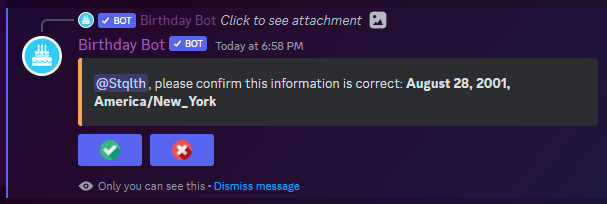
Ensure this is the correct information, then confirm by clicking on the checkmark.
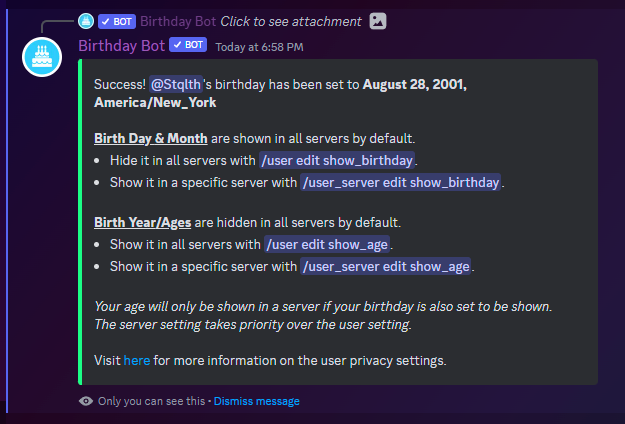
For users, that is it! Server owners will have to do a bit more, but Birthday Bot makes it easy with an interactive setup. For more information on server setup, follow our guide [here](/server-setup/required-setup).
As the message states, birth years are hidden in all servers by default. Learn more about Birthday Bot's user privacy settings [here](https://birthdaybot.scottbucher.dev/faq-1/user/user-privacy).
{% hint style="info" %}
Birthday Bot stores your information in a secure database, but also allows users to remove their personal data at any time.
[Learn how](/commands)
{% endhint %}
# Commands
This page lists all usage and information about Birthday Bot's commands.
#### Prefix: `/`
Please note the space after **bday** in the prefix. Each command should be run as follows:\
/``
`<>` denotes an mandatory parameter, while `[]` refers to an optional one.
Example Command Usage: `/set`
For help with command arguments, view the [Legend](/commands#legend).
### General
`/premium` - View information about Birthday Bot Premium.
`/subscribe` - Subscribe to Birthday Bot Premium.
`/help` - Help with understanding the basics of Birthday Bot.
`/view type:[type] user:[@User]` - View the birthday or member anniversary of yourself or another user. Defaults to birthday.
`/next [type]` - View the next celebration event(s) in the server. Defaults to birthday.
`/list type:[type] page:[page]` - View the list of birthdays/anniversaries for the server. Defaults to birthday.
`/map` - View the time zone map.
`/vote` - Vote for Birthday Bot.
`/link link:donate` - Donate to Birthday Bot!
`/link link:support` - Join the support server
`/link link:invite` - Invite Birthday Bot.
`/link link:docs`- View Birthday Bot's documentation.
`/link link:faq` - View Birthday bot's FAQ.
`/suggest date:[date] timezone:[timezone] user:[@User] birth_year:[2001]` - Suggest a birthday for another user, they will have to confirm the information.
### User Commands
`/set date:[date] timezone:[timezone] birth_year:[2001]` - Set your birthday.
`/user settings` - view your global user settings.
`/user_server settings` - view your sever specific user settings.
`/user edit show_birthday` - edit your global show birthday setting.
`/user edit show_age` - edit your global show age setting.
`/user_server edit show_birthday` - edit your server show birthday setting.
`/user_server edit show_age` - edit your server show birthday setting.
`/purge` - Remove your birthday data.
`/claim_role option:` - Claim either your member anniversary role or your zodiac role.
### Information
`/help` - Help with understanding the basics of Birthday Bot.
`/info` - Info about the Birthday Bot.
`/settings option:[option]` - View server's settings. Options: `General`, `Message`, & `Advanced`. Defaults to General/
### [Server Configuration](#general) (Administrators-only)
`/test type: user:[User] year:[anniversary year]` - Test a [Celebration event](/faq-1/general#what-is-a-celebration-event). Optional parameter of a user to mention and year (anniversaries only).
[**Setup** ](/server-setup/required-setup)**Commands**
`/setup` - Interactive guide for basic server setup.
`/config option:Name Format` - Configure[ Name Format](/faq-1/general#what-is-the-name-format-setting) setting.
`/config option:Time Zone` - Configure the [Server Time Zone](/faq-1/general#what-is-the-default-timezone-setting) setting.
`/config option:Use Time Zone` - Configure the [Use Time Zone](/faq-1/birthday-system#what-is-the-use-time-zone-setting)[ ](/faq-1/birthday-system)setting, which is the time zone that the bot will use to send celebration messages.
`/config option:Date Format` - Configure the[ ](/faq-1/general#what-is-the-name-format-setting)[Date Format](/faq-1/general#what-is-the-date-format-setting) setting.
`/config option:Image Format` - Configure the [Image Format](/faq-1/custom-messages#what-is-the-image-format-setting) setting.
`/config option:Disable Ages` - Configure the if [ages are shown](/faq-1/birthday-system#what-is-the-disable-ages-setting) in this server.
`/config option:Filter Birthday Age Messages` - Configure the
[Filter Birthday Age Messages](/faq-1/birthday-system#what-is-the-filter-birthday-age-messages-setting) setting.
`/config option:Zodiac Auto Assign.` - Configure the [Zodiac Auto Assign](/faq-1/birthday-system/zodiac-system#what-is-the-automatically-give-roles-setting-1) Setting.
`/config option:Member Anniversary Remove Old Roles` - Configure the [Member Anniversary Remove Old Roles](/faq-1/member-anniversaries#what-is-the-member-anniversary-remove-old-roles-setting) Setting.
[**Custom Message**](/faq-1/custom-messages) **Settings**
**NOTE: To find a message id, use the /view\_messages command.**
`/view_messages type: page:[page]` - List all custom messages of the given type.
`/message add type: message: image:[image]` - Add a custom birthday message. `{Users}` is the placeholder for the messages to mention the birthday users. **Note:** Only Premium servers can set [user-specific messages](/premium-features#user-specific-custom-messages) and images.
`/message edit description type: message: description:` - Edit a pre-existing message's description.
`/message edit embed type: message: embed:` - Edit a pre-existing message's embed setting.
`/message edit color type: message: color:` - Edit a pre-existing message's [color setting](/faq-1/custom-messages/customizing-custom-messages#customizing-the-color-of-a-message-premium-only) (Premium Only).
`/message edit title type: message: title:` - Edit a pre-existing message's [title setting](/faq-1/custom-messages/customizing-custom-messages#customizing-the-title-footer-of-a-message-premium-only) (Premium Only).
`/message edit footer type:<type> message:<message_id> footer:<footer>` - Edit a pre-existing message's [footer setting](/faq-1/custom-messages/customizing-custom-messages#customizing-the-title-footer-of-a-message-premium-only) (Premium Only).
`/message edit image type:<type> message:<message_id> image:<image file>` - Edit a pre-existing message's [image setting](/faq-1/custom-messages/customizing-custom-messages#customizing-the-image-of-a-message-partially-premium-only) (Premium Only).
`/message remove message:<message_id>` - Remove a certain custom message of the given type.
`/message clear type:<type>` - Clear all custom messages of the given type.
`/edit hour type:<type> time:<0-23>` - Set the time messages should be sent in your server for the given type.
`/edit ping type:<type> ping:<role/group>` - Set the custom message ping of the given type.
`/edit post_mode type:<type> postMode:<postMode>` - Configure the[ ](/faq-1/general#what-is-the-name-format-setting)[Post Mode setting](/faq-1/general#what-is-the-post-mode-setting) for the given type.
`/edit channel type:<type> channel:<channel>` - Edit the channel messages will be sent in for the given type.
`/message test type:<type> position:<position> user_count:[count]` - Test a custom message of the given type.
**Trusted System Settings**
**NOTE:** The free version of Birthday Bot can only have one trusted role. Check out [Birthday Bot Premium](/premium-features)!
`/trustedRole add role:<@Role>` - Add a trusted role.
`/trustedRole remove role:<@Role>` - Remove a trusted role.
`/trustedRole remove id:<Id>` - Remove an Id.
`/view_trusted_roles page:[page]` - List all trusted roles.
`/trusted_role edit option:` - Edit how trusted roles work. The description of each will be in the option name.
[**Blacklist** ](/faq-1/birthday-system#what-is-the-birthday-blacklist)**Settings**
`blacklist add role_or_user:<@User/@Role>` - Add a user/role to the birthday blacklist.
`blacklist remove id:<Id>` - Remove an Id from the blacklist.
`blacklist remove role_or_user:<@User/@Role>` - Remove a user/role from the blacklist.
`/blacklist clear` - Clear the birthday blacklist.
`/view_blacklist page:[page]` - View the birthday blacklist list.
### [**Premium** ](/premium-features)**Commands**
`/premium` - View information about your server's premium subscription.
`/message edit color type:<type> message:<message_id> color:<color/hex>` - Edit a pre-existing message's color setting.
`/message edit title type:<type> message:<message_id> title:<title>` - Edit a pre-existing message's title setting.
`/message edit footer type:<type> message:<message_id> footer:<footer>` - Edit a pre-existing message's footer setting.
`/message edit image type:<type> message:<message_id> image:<image file>` - Edit a pre-existing message's image setting (Premium Only).
`/zodiac set_emoji sign: emoji:` - Set a custom zodiac emoji
`/zodiac clear_emoji sign:` - Clear a custom zodiac emoji
`/zodiac set_role sign: role:` - Set a zodiac role
`/zodiac clear_role sign:` - Clear a zodiac role
#### [**User Specific**](#user-specific-messages) **Messages**
`/message add type:<type> message:<message>` - Add a message of the given type. It can add [user-specific custom messages](/premium-features#user-specific-custom-messages)! (Hint simply @ the user instead of using the {Users} placeholder!)
* Example Usage: `/message add type:Birthday message:Happy Birthday @Stqlth! Hope you have a great day!`
* Placeholder for years (not in birthday messages): `%Year%`
* Placeholder for the server name: `%Server%`
`/view_messages type:<type>`- [User-specific-messages](/premium-features#user-specific-custom-messages) will automatically show up within this list for the given type.
`/message remove message:<message_id>` - Remove a [user-specific-message](/premium-features#user-specific-custom-messages) of the id.
`/message clear type:<type>` - Clear all [user-specific custom messages](/premium-features#user-specific-custom-messages) of the given type.
#### Member Anniversary Roles
`/mar add role:<@role> year:<year>` - Add a member anniversary role for the given year.
`/mar remove year:<year>` - Remove all member anniversary roles for the given year.
`/mar clear` - Clear all member anniversary roles.
`/view_member_anniversary_roles page:[page]` - List the member anniversary roles.
### Legend
#### Argument Requirements
Commands which allow/take arguments will be displayed with either `[]` or `<>`. Arguments in `[]` are **not** required while those in `<>` **are** required. If an argument in either `[]` or `<>` has a `/` between two things it means **OR**.
Example Command: `/message list type:<type> page:[page]`
In this command, you **must** give a type, but you do **not** have to give a page.
Some example usage:
`/message list type:Birthday` - Shows the first list.
`/message list type:Birthday page:3` - Shows the third page of birthday messages.
Example Command: `/list type:[type] page:[page]`
In this command, you do **not** have to give a type or a page, but you **can**.
Some example usage:
`/list` - Shows the birthday list starting at the first page.
`/list page:3` - Shows the birthday list starting at the third page.
`/list type:Member Anniversary` - Shows the member anniversary list starting at the first page.
`/list type:Member Anniversary page:3` - Shows the member anniversary list starting at the third page.
#### Argument Types
Multiple commands require or allow the type argument, this can appear as `[type]` or `<type>`.
This is the [celebration event](/faq-1/general#what-is-a-celebration-event) type, though it varies between commands slightly:
* **Birthday** - represents the birthday event of a user
* **Member Anniversary** - represents the member anniversary event of a user
* **Server Anniversary** - represents the server anniversary event of a server
* This type **can't** be used in the `/list` command
* **Event** - represents a custom event.
* **User Specific Birthday** - represents a user-specific birthday message
* This type is **only** used in the `/message clear` commands
* **User Specific Member Anniversary** - represents a user-specific member anniversary message
* This type is **only** used in the `/message clear` commands
# Premium Features
A list and explanation of all Birthday Bot Premium features. Thanks for considering supporting development! Premium costs $5.99 USD per month.
## No voting
With Birthday Bot Premium, members in your server will not have to vote for **any** command (you are already supporting the bot!).
## Priority Message Posting
Birthday Bot processes hundreds of thousands of servers every hour when sending celebration messages. This process can take up to 10 minutes to complete so some messages aren't able to be sent at exactly the start of the hour. Due to this, the bot prioritized servers with premium to ensure their messages are sent first.
## User-specific custom messages
A user-specific custom message is a message which is set for a specific user in your Discord and will only be sent for that user. Premium servers can set user-specific custom messages for birthdays and member anniversaries because, obviously, there are not user-specific messages for server anniversaries since they do not involve users.
**Commands:**
`/message add type:<type> message:<message>` - mention the user instead of using the `{Users}` placeholder
**Example usage:**
`/message add type:birthday message:Happy birthday @Stqlth! Hope you have a great day!`
`/message add type:memberAnniversary message:Woah, @Stqlth is celebrating %Year% year(s) in %Server%!`
`bday message remove type:<type> position:<position>` - remove a custom message.
`/message list type:userSpecificBirthday` - list all user-specific birthday messages.
`/message list type:userSpecificMemberAnniversary` - list all user-specific member anniversary messages.
## Custom Message Embed Settings
With Birthday Bot Premium servers are able to edit the Color, Title, Footer, and Image of a custom message of any type. For these settings to take effect the custom message must have `true` for the embed setting.
## Multiple Custom Messages!
The free version of Birthday Bot can have 1 of each type of custom messages; however, Birthday Bot Premium servers can have up to 500 of **each** type. (500 birthday messages, 500 member anniversary messages, etc.)
Commands:
`/message add type:<type> message:<message>` - add a custom message.
Example:
`/message add type:birthday message:Happy birthday {Users}!`
`/message add type:memberAnniversary message:Woah, {Users} have been in {Server} for {Year} year(s)! Congrats!`
## Member Anniversary Roles
Member Anniversary Roles are a Birthday Bot Premium-**only** feature. These are roles given to a member on their member anniversary. For example, someone celebrating their 5th year in a Discord will be given the `5-Year Veteran` role if it is set as a member anniversary role for year 5. Each year can only have one associated role.
You can have up to 250 member anniversary roles! (I doubt you will use them all.)
## Multiple Trusted Roles
Trusted roles decide who in your server has their birthday celebrated, along with also having specific settings to decide if trusted roles should block only messages, roles, or both. Free servers can have **one** trusted role, but premium servers can have up to 250.
Additionally, the new `RequireAllTrustedRoles` setting decides if a user needs all of the trusted roles to have their birthday celebrated. If set to false, however, users will only need one of the trusted roles to have their birthday celebrated.
## Custom Events
Custom Events allow for servers to celebrated different types of events that aren't already pre-programmed into Birthday Bot. These events can be anything from holidays to fictional birthdays, anything your server wants a custom message to be sent for at a specific day and hour., yearly, or only once.
Each Event has a Custom Message tied to it. This means you can configure every setting of the custom message as you would a Birthday or Anniversary Message. Additionally, each event has it's own ping setting and name.
## Permanent Lists
The `/list` command is a powerful command to see all the birthdays and member anniversaries in your server. With Birthday Bot Premium servers can set up a permanently list which Birthday Bot will refresh every 15 minutes to ensure the list always stays up to date.
## Filter Birthday Messages Based on Placeholders
With the introduction of birth years and ages users now have the ability to set their birth years while also maintaining the ability to hide it from whichever servers they like. This also added the {Age} and {Year} placeholder for birthday messages but not all users will have a year/age in their message.
With this setting, when enabled, users without a year set will only use custom messages with out either of those placeholders, and users with a year will only use custom messages with them.
## Support Development!
I started Birthday Bot as an open-source free birthday manager for any Discord server. While the majority of features are still available for free, premium has been added to help pay for the server cost as Birthday Bot continues to grow because up until now it has all been paid for out of my pocket. However, Premium is completely optional and I understand if you stick with the free version as it will continue to be actively updated and added to.
Other ways to support Birthday Bot:
`/vote` - vote for our bot!
`/donate` - donate any amount!
# Terms of Service
### Usage Agreement
By inviting the bot or using its features, you are agreeing to the below mentioned Terms of Service and Privacy Policy.
You acknowledge that you have the privilege to use the bot freely on any Discord server you share with it, that you can invite it to any server that you have "Manage Server" rights for and that this privilege might get revoked for you, if you're subject of breaking the terms and/or policy of this bot, or the Terms of Service, Privacy Policy and/or Community Guidelines of Discord Inc.
Through inviting or interacting with the bot it may collect specific data as described in its Privacy Policy. The intended usage of this data is for core functionalities of the bot such as command handling, server settings, and user settings.
### Intended Age
The bot may not be used by individuals under the minimal age described in Discord's Terms of Service.
Features, such as those which are marked as "NSFW" (Not safe for work) may not be used by individuals under the age of maturity in their country. Doing so will be seen as a violation of these terms.
### Affiliation
The bot is not affiliated with, supported by, or made by Discord Inc.
Any direct connection to Discord or any of its trademark objects is purely coincidental. We do not claim to have the copyright ownership of any of Discord's assets, trademarks or other intellectual property.
### Liability
The owner(s) of the bot may not be made liable for individuals breaking these Terms at any given time. We have faith in the end users being truthful about their information and not misusing this bot or the services of Discord Inc in a malicious way.
We reserve the right to update these terms at our own discretion, giving you a 1-week (7 days) period to opt out of these terms if you're not agreeing with the new changes.
You may opt out by removing the bot from any server you have the rights for.
### Contact
People may get in contact through the official support server of the bot.
Other ways of support may be provided but aren't guaranteed.
## Privacy Policy
### Usage of Data
The bot may use stored data, as defined below, for different features including but not limited to:
* Command handling
* Providing server and user preferences
The bot may share non-sensitive data with 3rd party sites or services, including but not limited to:
* Aggregate/statistical data (ex: total number of server or users)
* Discord generated IDs needed to tie 3rd party data to Discord or user-provided data
Personally identifiable (other than IDs) or sensitive information will not be shared with 3rd party sites or services.
### Updating Data
The bot's data may be updated when using specific commands.
Updating data can require the input of an end user, and data that can be seen as sensitive, such as content of a message, may need to be stored when using certain commands.
### Temporarily Stored Data
The bot may keep stored data in an internal caching mechanic for a certain amount of time. After this time period, the cached information will be dropped and only be re-added when required.
Data may be dropped from cache pre-maturely through actions such as removing the bot from the server.
### Removal of Data
Manual removal of the data can be requested through the official support server. Discord IDs such as user, guild, role, etc. may be stored even after the removal of other data in order to properly identify Birthday Bot specific statistics since those IDs are public and non-sensitive.
For security reasons we will ask you to provide us with proof of ownership to the data you wish to be removed. Only a server owner may request manual removal of server data.
##
# Required Setup
This guide aims to help walk you through each step of the server setup process as well as show the functionality of our interactive setup commands.
In this guide, we will be using Birthday Bot's interactive setup command.
Start by using `/setup`.
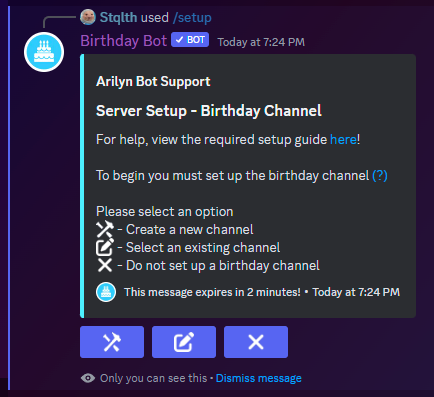
You now have three options to choose from to set your birthday channel. The first will automatically generate the default birthday channel; the second will allow you to choose from your server's current channels; and the third will skip setting a birthday channel.
For this example, we will choose the **second** option and receive a prompt.
<figure><img src="https://birthday-bot-docs-images.s3.amazonaws.com/02-Birthday+channel+prompt.png" alt=""><figcaption></figcaption></figure>
Click the "Enter Response" button.

You are unable to tag channels in these text modals, so you must enter the name of the channel. Birthday Bot will try and find matching channels;
Even if you don't type out the entire channel name, it can still detect the correct channel. For instance, if you have a channel called birthdays-and-anniversaries, if you just enter the word birthdays the bot will still detect the correct channel. Note, if another channel has the term birthday it could incorrectly detect that channel instead.
Once the birthday channel is set, you will receive a second prompt.

This prompt is very similar to the previous with the same three options; however, this time, for the birthday **role**.
Again, we will choose the second option and receive a similar prompt as before.

Again we will receive a prompt.

This input box is very similar to the one we saw with the birthday channel. Enter the name (or part of the name) of the role that you would like the birthday role to be.
{% hint style="warning" %}
The Birthday Bot **Role** must be higher than the Birthday Role **and** the Bot must have the **Manage Roles** permissions.
{% endhint %}
Finally, you will be given a summary of the completed setup.
<figure><img src="https://birthday-bot-docs-images.s3.amazonaws.com/07-Setup+success+message.png" alt=""><figcaption></figcaption></figure>
This completes the required setup process. View other server setting commands [here](/commands#server-configuration-admins-only).
# General
General FAQ for admins setting up Birthday Bot.
## What is a Celebration Event?
There are three types of events, all falling under the title of "Celebration Event":
* **Birthday Event** - The typical event of a user's birthday.
* **Member Anniversary Event** - The yearly anniversary of a member joining the server.
* **Server Anniversary Event** - The yearly anniversary of the creation of a server.
* **Custom Event** - A Custom Event configured by the server.
Since the addition of anniversaries and custom events, the celebration event term has been added in order to distinguish between the different settings servers can configure.
## What is an embed?
An example of a message embed is to run the command `bday help`! You will notice the message is specially formatted using Discord API. By default the birthday message is embedded; however, if you use a link to a GIF or image in your custom birthday message, they will not work in an embedded message, so, with Birthday Bot Premium you can add an image to the custom image.
Additionally, free servers can still disable the embed setting and add a link to an image or gif!
## What is the name format type?
The [name format setting](#what-is-the-name-format-setting) decides how the bot displays a user's name.
However, I have split the setting up into multiple sections so that servers can configure how names are shown in specific parts of the bot. The three options are as follows:
* Message - how the bot formats names in custom messages
* List - how the bot formats names in the `/list` command
* Other - how the bot formats names in all other places (i.e. `/next` command)
## What is the name format setting?
You may have run into a bug with Discord where the bot is displaying a bunch of numbers (like: `<@478288246858711040>`) instead of correctly mentioning a user. This can happen either because that user has left the Discord or because Discord's cache wasn't up to date.
To fix this, I added the Name Format setting which decides in which format Birthday Bot should display users. Additionally, there are multiple Name Format settings
* Message - how names appear in custom messages
* List - how names appear in the `/list` command
* Other - how names appear in other commands such as `/next`
There are currently four options:
**Mention** (default):
* Displays the user in the typical `@User` format.
* Example: **@Stqlth**
**Username:**
* Displays the user's username boldened.
* Example: **Stqlth**
**Nickname**:
* Displays the user's nickname (or username, if a nickname is not set) boldened.
* Example: **Scott**
**Tag (DEPRECATED)**
* Displays the user's username followed by their discriminator.
* Example: **Stqlth#0001**
## **What is the server time zone setting?**
The time zone setting is the time zone for your server, this has a couple uses.
Firstly, when a user is setting their birthday for the first time in your server, if the time zone is set, the user will be suggested to use the time zone that the server uses (they can still choose a different one).
Secondly, it *can* also be used to decide the time a message/role is sent/given. This is dependent on the use time zone setting.
Lastly, all Member Anniversaries, Server Anniversaries and Custom Events are celebrated based on the server time zone. Because of this, for any of them to work, the server time zone **must** be set.
## What is the Date Format setting?
The date format setting decides how Birthday Bot detects birthdays when users are setting their birthday in your server. There are two options. The default, `month_day` and `day_month`. They function as their name suggests. For instance, if your server is using the **month\_day** setting then the bot will detect the day **01/12** as January 12th. However, if your server is using the **day\_month** setting then the bow will detect the date **01/12** as December 1st.
## What is the Birthday Blacklist?
The birthday blacklist is a system that allows servers to prevent a member or members with a specific role from having their birthday celebrated. This is to help server owners prevent members from abusing the system by setting their birthday multiple times.
## What is the Post Mode setting?
The post mode setting is used to configure what actions the bot uses when posting an event message. By default, this setting is set to `Post Only` and is the only option for the free version of Birthday Bot. Premium servers can choose two other options:
`Post and Pin` - The bot will post the event message and also pin it in the channel
`Thread` - The bot will post the event message and start a thread for it.
This setting can be configured for the the birthday, member anniversary, and server anniversary systems individually.
# User
FAQ for users setting up their birthdays through Birthday Bot.
## I can't find my time zone.
[Kevin Novak](https://github.com/KevinNovak) has created a handy [map time zone picker](https://kevinnovak.github.io/Time-Zone-Picker/)!
Simply click your location on the map, and use the name displayed in the drop-down box as your time zone.
You can then take your time zone name and use it in the /`set` command.
## Why does Birthday Bot need my time zone?
Birthday Bot will use your time zone to know the exact hour to celebrate your birthday. If Birthday Bot did not know your time zone, then it would most likely give your the birthday role and/or send the birthday message too early or too late.
## Why does Birthday Bot only need my birth month and day?
Birthday Bot will use your birth month and day to decide when to celebrate your birthday. You can optionally set your birth year, but it is not required.
## I entered my time zone as EST, but Birthday Bot detected the wrong time zone.
As shown, when a user runs /`set`, Birthday Bot does **not** accept abbreviated time zones like **EST**, **UST**, etc. However, even when users enter an incorrect time zone, Birthday Bot will attempt to find the best fit for the user. For example, entering **newyork** as your time zone will trigger the bot to detect **America/New\_York** as your time zone, or in this case, entering **EST** as your time zone will trigger the bot to select the Australia/W**EST** time zone. (This specific case no longer applies since abbreviated timezones like EST are now automatically refused by the bot, however, the concept still applies).
## Why am I required to vote?
I actively develop, host, and maintain Birthday Bot for people to use with the ability to pay absolutely nothing. Voting is one of the most essential aspects of promoting Discord bots and is essential to keep Birthday Bot growing. While I understand voting can be a pain, it is the only thing required to use and support Birthday Bot and as a perk; with Birthday Bot Premium, no one in your server has to vote.
# User Privacy
FAQ for how Birthday Bot protects users' privacy.
## Should I give Birthday Bot my birth year?
Submitting your birth year is completely optional. If you do, by default it will be hidden to all servers, and you can configure which servers to show it in, or to show it in all. When your birth year is not hidden, people will be able to see it in `/next`, `/view`, `/list`, as well as birthday messages through the `{Age}` and `{Year}` placeholders.
## How do the user privacy settings work?
By default, Birthday Bot does not show your birth year/age to **anyone**.
There are two settings that decide how your information is shown. Firstly, there is the global setting. This setting is used when you have not set a specific setting for a server. By Default the global settings are the following:
* Show Birthday: True
* Show Age: False
This means that by default Birthday Bot will show your birthday (Month & Day) in all servers that you are in which also have Birthday Bot. However, Birthday Bot will not show your age anywhere by default as well.
To change a global setting use the `/user edit` command.
* `/user edit show_birthday`
* `/user edit show_age`
The second setting is the **server specific** setting. This setting, as the name suggests, is specific to each server you configure it in. If you set a server setting, it will override the global.
To change a server setting use the `/user_server edit` command.
* `/user_server edit show_birthday`
* `/user_server edit show_age`
These settings allow you to strictly configure which servers can see your birthday and birth year/age.
**Note:**
* If you disable your birthday it will effectively disable your age. This is because there is no part of Birthday Bot which uses your birth year/age and not your birthday.
* Time zones are tied to your birthday privacy settings. If you hide your birthday your time zone will also be hidden.
# Custom Messages
FAQ for information about the different types of custom messages.
## What are the different types of custom messages?
* Birthday
* 1 custom message; premium servers get 500.
* Sent when a birthday in your Discord server happens.
* Sent based on the user's time zone, unless the default server time zone is set and the UseTimezone is set to `server`.
* Free Placeholders:
* `{Users}` - the bot will replace this with the name of the birthday user.
* `{Server}` - the bot will replace this with the name of the Discord server.
* `{Age}` - the bot will replace this with the age the user is turning (if their birth year is set)
* `{Year}` - the bot will replace this with the birth year of the user (if their birth year is set)
* Premium Placeholders:
* `{Zodiac Sign}` - the bot will replace this with the user's zodiac sign
* `{Zodiac Role}` - the bot will replace this with the user's zodiac role
* `{Zodiac Emoji}` - the bot will replace this with the user's zodiac emoji, either the default or a custom one!
* Member Anniversary
* 1 custom message; premium servers get 500.
* Sent when a member's join anniversary in your Discord server happens.
* Sent based on server's default time zone.
* Placeholders:
* `{Users}` - the bot will replace this with the name of the user whose membership anniversary it is being celebrated.
* `{Year}` - the bot will replace this with the number of years the member has been in the Discord server.
* `{Server}` - the bot will replace this with the name of the Discord server.
* Server Anniversary
* 1 custom message; premium servers get 500.
* Sent when a Discord server's creation anniversary happens.
* Sent based on server's default time zone.
* Placeholders:
* `{Year}` - the bot will replace this with the number of years old the Discord server is.
* `{Server}` - the bot will replace this with the name of the Discord server.
* Custom Events - Premium Only
* 1 per event
* Sent on the date and hour configured to the vent
* Sent based on a server's time zone setting
* Placeholders
* `{Server}` - the bot will replace this with the name of the Discord server.
* `{Year}` the current year
See [here](/premium-features#user-specific-custom-messages) for information about user-specific custom messages. (These are preset messages for a specific user in your Discord server).
## What is a message ping?
A message ping setting decides which role or "group" to mention (@) when Birthday Bot sends an event message. Acceptable values include `everyone`, `here`, `@role/role-name`, and `none`. You can also include the `{Users}` placeholder in the ping setting for birthdays and member anniversaries to ping them outside an embed.
This setting can be changed for all messages of each message type, not by each singular message.
## What is the message time?
The message time is the hour when the bot will send a custom message (in the user's time zone or the server's default time zone, if set up). This setting only affects the message and roles given with certain events that will always happen at midnight (12 am) in the user's time zone or the server's default time zone, if set up. However, Birthday Bot allows you to customize the messages' time so you aren't pinging `@everyone` or `@here` at midnight.
This setting can be changed for all messages of each message type, not by each singular message.
## What is the image format setting?
Message embeds have two slots for images, the thumbnail (small and to the right of the message description) and image (large and below the message description). This setting allows premium servers to configure how their images should appear.
# Customizing Custom Messages
Information about customizing custom messages.
## Customizing the embed setting of a message
A message can be embedded or not. Here is an example of an embedded message:

A non-embedded message shows up as regular text.
When adding a new message the bot will prompt you for an embed setting.
`/message edit embed`- Edit a pre-existing message's embed setting.
This setting can be changed for each message individually.
## Customizing the color of a message \[Premium Only]
A message embed color is the color on the left side of a message embed. This setting won't apply if your use embed setting is set to false.
When adding a new message the bot will prompt you for a color if the message is embedded.
`/message edit color` - Edit a pre-existing message's color
This setting can be changed for each message individually.
## Customizing the title/footer of a message \[Premium Only]
Each embedded custom message can have a custom title and footer which appear above and below the message description respectively.
When adding a new message the bot will prompt you for a title and footer if the message is embedded.
`/message edit title`- Edit a pre-existing message's title
`/message edit footer`- Edit a pre-existing message's footer
This setting can be changed for each message individually.
## Customizing the image of a message \[Partially Premium Only]
Servers with Birthday Bot Premium can set the thumbnail of an embedded message using the following command:
`/message edit image`- Edit a pre-existing message's image
When adding a new message the bot will prompt you for a image if the message is embedded.
However, for non-premium servers images can be added by setting the custom message to not be embedded and simply linking to the desired image. Discord will automatically display the image if it is a valid link.
# Birthday System
FAQ for information about the birthday system.
## Can I set birthdays for my users?
No, unfortunately. Birthdays are stored **globally**, which means your birthday in Discord Server A is the same as in Discord Server B. As a result, we cannot give server owners control over their user's information, due to it being able to affect other servers.
However, server admins can **SUGGEST** a birthday for a user. This means an admin can input all of the information but at the end, the user must confirm the inputted information.
## Birthday Bot announced/gave the birthday role/message at the incorrect time.
A few things affect a birthday message time.
First is your guild server message time (configure this with `/edit hour type:<type> hour:<0-23>`), if for example, you run this: `/edit hour type:birthday hour:9`, the birthday **message** will send at 9 am **for the birthday user**. The type refers to the event type, possible values include Birthday, Member Anniversary, and Server Anniversary.
Secondly is the time zone the bot is configured to use. By default, the bot will use the user's time zone the set when they set their birthday with `/set`. However, if the server has a time zone set and the [Use Time Zone](#what-is-the-use-time-zone-setting) setting is set to `Server` then the bot will use the server's time zone when celebrating birthdays.
## What is the birthday channel?
The birthday channel is the channel where the bot will announce birthdays; however, it is not required for the bot to work. For example, if you do not set the birthday channel, Birthday Bot will only attempt to give birthday users the birthday role.
## What is the birthday role?
The birthday role is the role that the bot will give to users on their birthday; however, it is not required for the bot to work. For example, if you do not set the birthday role, Birthday Bot will only attempt to send a birthday message in the birthday channel.
## What does it mean by the birthday role is actively removed?
Instead of tracking 24 hours after each birthday to remove the role, Birthday Bot simply removes the role from anyone whose birthday it isn't every hour. This means you should refrain from making the Birthday Role a role that can be received by any other means.
## What is the birthday blacklist?
The birthday blacklist is an easy way for server owners to ban users or roles from Birthday Bot in their Discord. Instead of using something like the trusted system, which decides who ***does*** have their birthday celebrated, the birthday blacklist is a list of people and roles who ***do not*** have their birthday celebrated. The blacklist supersedes the trusted role system, meaning, someone who is both on the birthday blacklist or has a role in the birthday blacklist **and** who has the trusted role, will still **not** have their birthday celebrated.
## What is the disable ages setting?
With the introduction of birth years users are able to show their age and birth years in whatever servers they want to. However, some servers might not want this for any number of reasons. Enabling this setting will hide everyone's age/birth year in the server.
## What is the use time zone setting?
If the server time zone is set, then servers can decide which time zone to use for the birthday celebration. If this setting is set to **`server`**, all birthday events will happen based on the **server**'s time zone and if this setting is set to **`user`**, all birthday events will happen based on the **user**'s time zone.
Note: If the **use time zone** setting is set to **`server`** and the server time zone is **not** set, then the user's time zone will be used for birthday events.
## What is the filter birthday age messages setting? (Premium Only)
With the introduction of birth years/ages the {Age} and {Year} placeholders were added for custom birthday messages. However, not everyone has their birth year set or they might hide it from some servers.
Thus, this command lets you configure the bot to ignore some messages with certain placeholders, depending on if the user has their age set in the server.
If this setting is turned off, the bot will continue to choose a random birthday message from your server's list of custom birthday messages.
If this setting is turned on and the user
* has their birth year set and shown in this server: the bot will only choose from birthday messages which have **either** the {Age} or {Year} placeholder set
* does not have their birth year set or it is hidden in this server: the bot will only choose from birthday messages do not have the {Age} or {Year} placeholder in it.
# Trusted System
The trusted system decides which users will have their birthday celebrated.
## Do I need to set up the Trusted Role?
No, the trusted role falls under the category of "Optional Server Settings", this means the bot will run perfectly fine without having the trusted role set.
However, the trusted role system is a feature if servers need to limit which users should have their birthday celebrated. A good example of the trusted role system in use was our [Discord support server](https://discord.gg/9gUQFtz). In our support server, we had our trusted role set as the Staff role so only our staff had their birthdays celebrated in the support server.
## What is the trusted prevents message/role/ping/appearance setting?
The trusted role is the role that can be set up so a user needs it in order to have their birthday celebrated. If the setting `Trusted Prevents Message` is enabled/true, then only users with the trusted role will receive a birthday message.
Likewise, if the setting `Trusted Prevents Role` is enabled/true, then only users with the trusted role will receive the birthday role. **Note:** if the trusted role itself is not set, none of these settings will apply, and anyone with a birthday set will receive both a birthday message and the birthday role (assuming both are set).
If the setting `Trusted Prevents Ping` is enabled/true, then only users with the trusted role will have a ping (based on the [birthday message ping setting](/faq-1/custom-messages#what-is-a-message-ping)) be sent along with the birthday message. Please note that if `Trusted Prevents Message` is false, and a user without the trusted role has a birthday, the ping will not be sent even if the `Trusted Prevents Ping` is true.
Finally, if the setting `Trusted Prevents Appearance` is enabled/true, then only users with the trusted role will appear in the `/next` and `/list` commands.
## What is the require all trusted roles setting?
As explained above, the trusted role(s) decides whose birthdays will be celebrated in a Discord. All servers are allowed to set a trusted role; however, Birthday Bot Premium servers are allowed to set multiple trusted roles (up to 250!). If multiple trusted roles are set, the require all trusted roles setting decides if a member needs all of the trusted roles to have their birthday celebrated or, if the setting is false, the member only needs one of the trusted roles to have their birthday celebrated.
# Zodiac System
## What are zodiac roles?
Zodiac roles are custom roles the bot will give to users periodically, as well as at certain specific events.
The first way users can get their zodiac role is by simply running the `/claim_role option:Zodiac - Claim your missing zodiac role.` command at any time, and if they don't already have a zodiac role, the bot will give them one based on their birthday.
Secondly, as mentioned previously, the bot will automatically give out zodiac roles in the following scenarios:
* A user has their birthday celebrated
* A user sets their birthday in your server
* Randomly! The bot now slowly gives out missing zodiac roles a few every hour to help ensure everyone gets one!
Finally, a new placeholder, `{Zodiac Role}` can now be used and the Bot will replace it with the @ of the zodiac role for that message.
## What are Zodiac Emojis?
The `{Zodiac Emoji}` placeholder can be used in custom messages and, much like the zodiac sign placeholder, will be replaced with the zodiac emoji equivalent, such as ♍!
However, the default emojis can be a little boring, so servers can use the `/zodiac set_emoji` command to set their own custom zodiac emojis for the bot to use! Here is an example:
<figure><img src="https://3812752228-files.gitbook.io/~/files/v0/b/gitbook-x-prod.appspot.com/o/spaces%2F-M8GXkVQ_rdbhS-xe8la%2Fuploads%2FyWha7R0amUl1a36b8zvD%2Fimage.png?alt=media&token=74ce7e62-50b2-407f-bb66-14ef8e7ccceb" alt=""><figcaption></figcaption></figure>
## What is the Automatically Give Roles setting?
This setting decides if the bot should automatically give users their zodiac roles in the following scenarios:
* A user has their birthday celebrated
* A user sets their birthday in your server
* Randomly! The bot now slowly gives out missing zodiac roles a few every hour to help ensure everyone gets one!
# Member Anniversaries
Member anniversaries are essentially how long a user has been in a Discord.
## What is the member anniversary channel?
The member anniversary channel is the channel where the bot will announce members' anniversaries; however, it is not required for the bot to work. If the member anniversary channel is not set, member anniversaries will not be announced.
## What are anniversary roles?
Premium servers have the ability to set up to 250 anniversary roles. For instance, on a member's 5th year in a Discord server, the bot can give them the `5 Year Veteran` role as a reward for being a part of the Discord for so long.
**Note:** In order for the bot to be able to give a user an anniversary role, this role must be below the bot's highest role and below the highest role of the user receiving the role (even admins!). The easiest way to avoid permission issues is having Birthday Bot's role at the very top of your role list.
## A user left/was kicked, can you fix their join date?
Unfortunately no, member join dates are determined by Discord and not handled by the bot.
## What is the Member Anniversary Remove Old Roles Setting?
If this setting is turned on, the bot, when giving a user a new member anniversary role, will remove all the other roles for that user. Essentially, this aims to make it so that users only have the most senior member anniversary role they are eligible for.
# Server Anniversaries
Server anniversaries are essentially how old a server is.
## What is the server anniversary channel?
The server anniversary channel is the channel where the bot will announce server anniversaries; however, it is not required for the bot to work. If the server anniversary channel is not set, server anniversaries will not be announced.
## We moved servers, can we change the age of our server?
No, Discord handles the age of servers and there is no way to change it.
# Custom Events
Custom Events are events created by a server at a specific date and time (yearly or not if given a year) which have a custom message tied to them. The bot will send this message to celebrate it.
## How many custom events can I make?
You can make up to 500 custom events!
## What is the event channel?
The event channel is where messages for custom events are sent.
## Should we set a year for our custom event?
That depends. If you give a year for your custom event, the bot will only celebrate it for that year. So, if your custom event is specific to a certain year, yes. However, if you want your custom event to be celebrated every year, no, you shouldn't.
## How do I edit a custom event's message?
In the `/event view` command it will show a message alias along with a break down of the event's custom message.
To edit anything about the message, use the typical `/message edit` command and give it the alias you got from the `/event view` command.
Learn more about custom messages and how to edit them [here](/faq-1/custom-messages/customizing-custom-messages).
# Permanent Lists
Outlines what exactly permanent lists and how to set them up.
## What are permanent lists?
All servers are able to use the `/list` command in order to generate a list of all of the birthdays or member anniversaries on their server. However, this list must be interacted with through buttons, or regenerated by running the command again in order to be updated.
Permanent lists allow premium servers to set up a list in a channel, and Birthday Bot will automatically refresh the list every 6 hours. This keeps the list up to date with all the most recent birthdays and anniversaries and is easy for users to quickly glance at knowing it is up to date.
Permanent lists also have buttons much like the normal lists in case your server is too large to fit on a single page.
## How do I set up a permanent lists?
If your server is a Birthday Bot premium subscriber simply run the `/permlist create` command and be sure to specify what type of list you want to generate and what channel you want the list to be generated in.
## I accidentally deleted the permanent list message what should I do?
If you accidentally deleted the channel or message which contained the permanent lists don't worry. Simply run the `/permlist create` command again to regenerate the list.
# 5.1 Update: Zodiac & Trusted Roles for Member Anniversaries!
Guide to the new 5.1 update.
## Introducing the Zodiac System!
The zodiac system is now available for all premium servers and has three main features: Signs, Roles & emojis. Please note, a user who hasn't set their birthday, or who has their birthday hidden in a server, is not eligible for any part of the Zodiac System.
### Zodiac Roles:
Servers are now able to set custom zodiac roles which the bot will give to users periodically, as well as at certain specific events. For the bot to give the roles, the `AutomaticallyGiveRoles` setting must be enabled, don't worry, by default it already is!
The first way users can get their zodiac role is by simply running the `/claim_role option:Zodiac - Claim your missing zodiac role.` command at any time, and if they don't already have a zodiac role, the bot will give them one based on their birthday.
Secondly, as mentioned previously, the bot will automatically give out zodiac roles in the following scenarios:
* A user has their birthday celebrated
* A user sets their birthday in your server
* Randomly! The bot now slowly gives out missing zodiac roles a few every hour to help ensure everyone gets one!
Finally, a new placeholder, `{Zodiac Role}` can now be used and the Bot will replace it with the @ of the zodiac role for that message.
### Zodiac Signs:
Premium servers can now use the `{Zodiac Sign}` prefix and Birthday Bot will replace it with the sign of whoever's birthday it is. For example, the custom message "Happy birthday {Users}! I didn't know you were a {Zodiac Sign}!" would be replaced to "Happy birthday Scott! I didn't know you were a Virgo!".
At this time English is the only supported language for zodiac signs.
### Zodiac Emojis:
Premium servers can now also use the `{Zodiac Emoji}` placeholder which, much like the zodiac sign placeholder, will be replaced with the zodiac emoji equivalent, such as ♍! However, the default emojis can be a little boring, so servers can use the `/zodiac set_emoji` command to set their own custom zodiac emojis for the bot to use! Here is an example:
<figure><img src="https://3812752228-files.gitbook.io/~/files/v0/b/gitbook-x-prod.appspot.com/o/spaces%2F-M8GXkVQ_rdbhS-xe8la%2Fuploads%2F2EbM19zeyHEZtghuLTbX%2Fimage.png?alt=media&token=aa2ec20e-4095-4035-8c45-b86eccde7dd2" alt=""><figcaption><p>Here is ours!</p></figcaption></figure>
## Trusted Roles for Member Anniversaries!
One of the first and most unique features Birthday Bot supports are trusted roles, a way to limit who has their birthday celebrated in a server, with it quickly expanding to allow server owners to decide if it will not just prevent the message/role, but also prevent a ping from being sent, prevent users from showing in commands, and supporting multiple trusted roles!
This system is now coming to Member Anniversaries, and will function nearly identical to birthdays, except now, there are trusted role settings for both birthdays and member anniversaries, separately.
Because of this, I broke out the trusted role settings into their own, `/trusted_role edit` command, and you no longer use the `/config` command to set these values.
Please note that preventing users from getting an anniversary message is free, however, the other settings will be premium only.
## Bug fixes
Along with these awesome new features this update also included a ton of bug fixes with the big ones being:
* Server Anniversaries are no longer based on when the bot joined the server
* The member anniversaries list now takes into account the server time zone
* Fixed the server name not showing in the premium activation message
## Coming Soon!
If you have any other suggestions, join our support server [here](https://app.gitbook.com/s/-M8GXkVQ_rdbhS-xe8la/%7B%7BREF:links.support%7D%7D) to suggest them!
* Support for Premium through Discord
* Early Birthday Reminders
* Revamped `/next` command
* User PFP as custom message image
* Configuration in the length of the `/list` message
* Multi-Lingual Support
* When this becomes available, I will open Translator applications in our [Discord Support Server](https://discord.gg/39w2cnBRa2).
# 5.0 Update: Ages, Custom Events, Permanent Lists & More!
Guide to the new 5.0 update.
## The Goal
The 5.0 update aims to add more customizability to the existing features of Birthday Bot while also adding new things to help servers celebrate any event they can think of.
## Introducing Birth Years/Ages & [User Privacy Settings](/faq-1/user/user-privacy)!
Birthday Bot has long stood out as it has, for the most part, never accepted the ages of it's users. This was an intentional decision in order to protect the privacy of our users. Thus, when I decided to add it, I made sure to add it in a way that grants users the most security possible.
Each user will have the option to add their birth year when setting their birthday, however, by default, it will be hidden **everywhere**.
Users now have two sets of privacy settings they can use, global and server. The global settings take affect when you haven't set your settings for a specific server. If you do edit your server specific settings, they will override your global settings for that server.
The two types of settings are the `Show Birthday` and `Show Age` settings. Below are the commands to configure these settings.
Global Commands
* /user settings
* /user edit show\_birthday
* /user edit show\_age
Server Commands
* /user\_server settings
* /user\_server edit show\_birthday
* /user\_server edit show\_age
By default, your birthday (Month and Day) will be shown in all servers as it always has, however, your age/birth year will be hidden in all server.
## Introducing [Custom Events](/faq-1/custom-events)!
Birthday Bot has always aimed to help servers celebrated the special events in their community, focusing around birthdays, and then later expanding into discord anniversaries for premium servers.
Custom Events was the next natural step for the bot and allows servers to celebrate any event they want with all the same customizability as before. From the start premium servers will have the ability to make a custom event for any date and hour, with a custom message to be sent at that time. Additionally, servers can set an event to be a specific year, or give none to make it yearly.
As mentioned each event will have a custom message associated with it. These messages are exactly like the custom messages for birthdays and anniversaries so you will be able to customize exactly what they say and how they look. Additionally, each event has it's own ping setting and name.
## Full Change Log
Below is the full list of changes which come with this update.
### Additions
* [Custom Events](/faq-1/custom-events) (Premium Only)
* Birthday Years/Ages (Free!)
* {Age} placeholder - what age they are turning
* {Year} placeholder - their birth year
* [Filter Birthdays Based on Age/Year](/faq-1/birthday-system#what-is-the-filter-birthday-age-messages-setting-premium-only) (Premium Server Setting)
* [Disable Ages](/faq-1/birthday-system#what-is-the-disable-ages-setting) setting to disable birthday years/ages completely in a server
* [Permanent Lists](/faq-1/permanent-lists) (Premium Only)
* A list similar to the one generated by `/list` but is updated by the bot every 15 minutes. Available for both birthdays and member anniversaries
* [Trusted Prevents Appearance Setting](/faq-1/birthday-system/trusted-system#what-is-the-trusted-prevents-message-role-ping-appearance-setting) (Free!)
* When true, only those with the trusted role will appear in commands like `/list` and `/next`
* [Multiple Name Format Settings](/faq-1/general#what-is-the-name-format-type) (All will default to what your current name format setting is)
* Message - how names appear in custom messages
* List - how names appear in the `/list` command
* Other - how names appear in all other places (`/view` command, etc.)
* [Image Format Setting](/faq-1/custom-messages#what-is-the-image-format-setting) (Premium)
### Changes
* [Blacklist ](/faq-1/general#what-is-the-birthday-blacklist)now extends to the `/list` and `/next` commands
* Numerous bug fixes and improvements
## Coming Soon!
If you have any other suggestions, join our support server [here](https://app.gitbook.com/s/-M8GXkVQ_rdbhS-xe8la/%7B%7BREF:links.support%7D%7D) to suggest them!
* Zodiac Signs
* Early Birthday Reminders
* Revamped `/next` command
* User PFP as custom message image
* Configuration in the length of the `/list` message
* Multi-Lingual Support
* When this becomes available, I will open Translator applications in our [Discord Support Server](https://discord.gg/39w2cnBRa2).
# Anniversary Update
Guide to the new 3.0 Birthday Bot Update.
## Introducing Anniversaries!
There are two types of anniversaries, member anniversaries and server anniversaries. A Member Anniversary is a yearly celebration of when a user first joined a server while a Server Anniversary is a yearly celebration of when the Discord server was created.
Both of these have their own settings similar to the ones currently in place for the Birthday System. For instance, you can now set a channel, custom messages, message times, and the mention setting. The message system was also revamped to work with these different message types and now each message can have a different [use embed](/faq-1/custom-messages#what-is-a-message-embed-setting) and [color setting](/faq-1/custom-messages#what-is-a-message-embed-color) (These replace the old global settings of these types but all your current messages have already had the old settings applied to them). Additionally, much like [user-specific](/premium-features#user-specific-custom-messages) birthday messages, premium servers can now add user-specific member anniversary messages.
Additionally, Birthday Bot can also automatically give users roles based on how long they have been a part of a server. For example, a server could have a `5-Year Veteran` role given to members on their five-year member anniversary. This is done through the new Member Anniversary Role system which is a [premium](/premium-features)-only feature.
Please note the anniversary system **requires** the [DefaultTimezone ](/faq-1/general#what-is-the-default-timezone-setting)of a server to be set.
## Changes
This update brings a ton of changes to [command syntax](/commands), bug fixes, and overall design changes.
* As stated above, previously, servers could set the message color ([premium](/premium-features)) and `useEmbed` setting.
* Now, these are specific to each message! This means some messages can be embedded while others are not and each message can have a different color.
* Removed commands for setting these globally.
* Updated commands which dealt with the birthday system now require a "[type](/commands#argument-types)" argument.
* For example, when updating channels you will need to specify if you are updating the `birthday`, `memberAnniversary`, or `serverAnniversary` channel.
* This also applies to adding/removing/clearing/listing messages, editing message settings, etc.
* Added the [NameFormat](/faq-1/general#what-is-the-name-format-setting) setting to decide how Birthday Bot will display users in messages. (Avoid the discord bug of just a bunch of numbers showing!)
* Added the [DefaultTimezone ](/faq-1/general#what-is-the-default-timezone-setting)setting to be used for anniversaries and suggesting the timezone for users.
* Added the [UseTimezone ](/faq-1/general#what-is-the-use-timezone-setting)setting to decide which to use for birthday celebrations.
* Reduced the number of custom messages for non-premium servers.
* Up to 3 custom birthday messages
* Up to 3 custom member anniversary messages
* Up to 1 custom server anniversary message
## Premium Changes & Additions
Thank you to all the Birthday Bot Premium subscribers for your support! Birthday Bot wouldn't be possible without you!
* Added Member Anniversary Roles as stated above
* These roles are given **permanently** to the user on whatever year the anniversary role is set to!
* Max of 250.
* There can only be one role per year.
* Example: The `5-Year Veteran` role can be added as a Member Anniversary role for year 5, so when a member reaches their 5th year in a server, they will receive the role.
* Moves the message color to be message-specific
* This means each message can be a different color!
* Have up to 500 of each custom message type
* Added support for multiple [trusted roles](/faq-1/birthday-system/trusted-system)
* Up to 250 trusted roles
* Added the new [RequireAllTrustedRoles ](/faq-1/birthday-system/trusted-system#what-is-the-require-all-trusted-role-setting)setting which decides if a user needs all of the trusted roles to have their birthday celebrated.
## Coming Soon!
If you have any other suggestions, join our support server [here](https://app.gitbook.com/s/-M8GXkVQ_rdbhS-xe8la/%7B%7BREF:links.support%7D%7D) to suggest them!
* Slash Command Support
* Slash commands will completely replace the current command system in the near future.
* Button Support
* Like slash commands, buttons will soon be added to commands where reactions were previously used as buttons.
* Multi-Lingual Support
* When this becomes available, I will open Translator applications in our [Discord Support Server](https://discord.gg/39w2cnBRa2).


